

How to Reset PowerShell Colors

I had been experimenting with getting the PowerShell console to look like the Monokai Pro colours and fonts. It seemed like it was working however some of the colors were REALLY hard to see.
Once I ran the script to make the change, I couldn’t get the colours back to normal specifically when I right-clicked the Powershell shortcut and said to run it as “Admin”.
This post will go over how to reset the PowerShell Console Colors for all accounts on the machine you are working on.
To reset the colours, you need to remove all “Console” Registry folders in each registry profile. The next time you load PowerShell Console the colors be set back to their normal settings.
Most sites will list tell you to remove this item from the registry however it is only part of the issue:
Computer\HKEY_CURRENT_USER\ConsoleYou will need to go to this Key in the Registry
Computer\HKEY_USERSAnd then in each of the users, remove the “Console” folder. If there is no Console folder just move onto the next user.
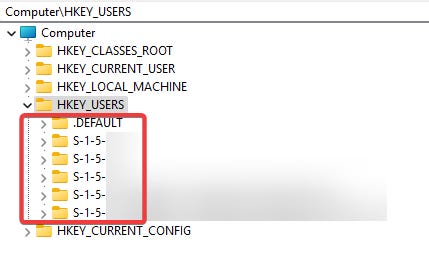
Once completed close the window and re-open it. The colours should be back to their default!